
Anúncios
You know what is genuinely frustrating? You spend a small fortune on a brand-new smartphone, the box has a massive “5G” logo on it, the salesperson promises you lightning-fast speeds… and then you look at your status bar. What do you see? A stubborn “4G” or “LTE.”
It feels like buying a Ferrari just to drive it in a school zone, doesn’t it?
Anúncios
The truth is, carriers and the Android system itself are a bit “conservative.” To save a little battery or prevent signal drops, your phone often prefers the comfort zone of 4G, even when there is a perfectly good 5G signal right next to you. But if you are like me and you want to use every bit of speed you paid for, there is a way to “bully” the system into prioritizing the maximum speed.
The good news? It’s easier than you think. Let’s unlock that power right now.
Download Links
- Force LTE Only (4G/5G)
Why Locking 5G is a Game Changer
We aren’t just talking about loading YouTube videos faster. We are talking about near-zero latency. You know that annoying lag in online games, or when you click a link and it thinks for a second before opening? On real 5G, that basically disappears.
Anúncios
The problem is the phone’s “Auto” mode is a coward. It feels a tiny dip in the 5G signal and immediately dumps you back to 4G.
When you use a tool to lock the network, you are telling the system: “I don’t want average stability, I want raw speed.” It’s like turning on “Sport Mode” in a car and gluing the button down. The difference in browsing, downloading large files, and streaming is night and day.
The Secret Tool Detailed
Most people think you need to “root” your phone or be a hacker to fix this. Not at all. The secret lies in a simple app that accesses a hidden Android engineering menu. I’m going to show you the one that actually works on almost every model.
Force LTE Only (4G/5G)
The Vibe of the App: Don’t let the name “LTE” (which is 4G) fool you. This app is the master key for all networks, including 5G. It’s rugged, technical, and doesn’t have annoying ads jumping in your face every two seconds. It’s a tool for people who know what they want.
What it Actually Does: It opens the radio settings of your processor. Deep inside, where the carrier doesn’t want you to mess around, you can specifically select the communication protocol you want to use.
The Secret Sauce: The big win here is the support for NR (New Radio). While other apps only show the old networks, this one identifies and lets you select the exclusive 5G standard. It works for Samsung, Motorola, Xiaomi, and pretty much any brand running Android 11 or higher.
My Honest Opinion: Is it ugly? Yes. Does it work? Like a charm. The interface looks scary at first with all those numbers, but you only need to touch one single line. You install it, configure it in 10 seconds, and forget it exists while your internet flies.
See Also
- Homemade Roach Killer
- Apps to Learn to Read and Write
- Who Viewed My Profile? The Best Apps
- 3 Cases That Changed Aviation Forever
- Metal Detector App
How to Start Without a Headache (Step-by-Step)
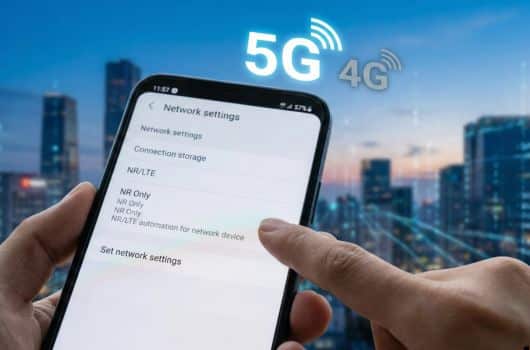
Pay attention here, because “5G” has a different name in the technical world. Follow this exactly:
- Download and open the Force LTE Only app.
- If your Android is new (which it likely is, since it has 5G), tap the button that says “Method 2: Android 11+”.
- A screen full of technical data will pop up. Ignore the noise. Look for “Set Preferred Network Type.”
- Tap that list and here is the trick: Look for “NR Only” or “NR/LTE”.
- NR stands for New Radio, which is the technical name for 5G.
If you choose “NR Only”, your phone will focus purely on 5G. If you choose “NR/LTE”, it prioritizes 5G aggressively but will fall back to 4G if the signal completely dies (which is a bit safer so you don’t lose connection entirely).
As soon as you select it, watch the icon at the top. The magic happens instantly. 🚀
Is It For You?
If you live in a big city or an area with decent coverage, and your phone still stubbornly sticks to 4G, the answer is a massive YES.
It makes no sense to have a V8 engine and drive in first gear. This app takes the training wheels off your bike and lets you actually race. Just a friendly heads-up: 5G does chew through battery a bit faster, so keep an eye on your charge. But for the speed? It’s totally worth it.
