
Anúncios
You know that moment when your kid asks for your phone for the tenth time today, and the mom guilt hits hard? You are not alone. Screen time has become the great modern villain of parenting. And it makes sense. We try to limit the hours, we put our foot down, but the truth is our little ones are fascinated by technology.
Anúncios
What if we flipped the script? Instead of fighting the devices, you can use apps to learn to read and write to turn that distraction into something incredibly productive.
No more crying at the kitchen table. No more frustration with snapping pencils. I promise the two options I’ve picked out today will show you exactly how to do this in real life. 📱✨
Anúncios
Why using literacy apps changes the game
Remember how we used to learn handwriting and those first syllables? Those endless notebooks, your hand cramping from repeating the same letters… It was a drag. The magic of today’s educational apps is how they disguise heavy learning as pure fun. It’s like hiding veggies in your kid’s pasta sauce: they get exactly what they need, but only taste what they love.
These little games offer the kind of friendly, instant feedback a paper book simply can’t provide. If the stroke of the letter “A” goes crooked, the app lets them know right away. It uses colors and sounds that grab their attention and encourage them to try again. Best of all, you get a few minutes of peace while they actually learn something, sitting right there on the living room couch.
The Best Options Detailed
LetterSchool
 4.3
4.3
LetterSchool – Learn to Write
Informações sujeitas a alteração. Consulte a loja oficial para detalhes atualizados.
The App’s “Vibe”: You know that look of modeling clay, little trains, and flashing lights that mesmerizes any kid? That’s exactly it. It’s perfect for the younger crowd, right in that preschool phase, who are having their very first contact with the world of letters and numbers.
What it actually does: This one hits hard on fine motor skills. Your child learns the exact shape of each letter (both block and cursive) by dragging their little finger across the screen. First, they watch the magic happen. Next, they try to follow the glowing dots, and finally, they try to draw it all by themselves. Simple as that.
The Secret Sauce (Differential): The animations. When your kid gets the tracing right, the letter transforms into a train rolling down a track, a lawnmower, or a rocket ship. It’s so hypnotic that even we adults want to steal the phone to play for a bit.
Honest Opinion: The interface is absolutely gorgeous, super intuitive, and it never lags. But here is a fair warning: the free version is just an appetizer. To unlock the entire alphabet and all the features, you’ll need to open your wallet. Even so, it is worth every penny if you want your child to stop writing their letters backward.
GraphoGame
 4.4
4.4
GraphoGame Brasil
Informações sujeitas a alteração. Consulte a loja oficial para detalhes atualizados.
The App’s “Vibe”: This one has a slightly more academic feel to it, but it’s cleverly disguised as a kids’ RPG. It is the surefire choice for kids who are already starting to put syllables together and need that little push in phonological awareness.
What it actually does: The goal here isn’t drawing a pretty letter. It’s about hearing and understanding its sound. The game plays sounds (phonemes), and the child has to pop a balloon or tap a chest holding the exact letter that matches that noise. As they progress, they customize a little avatar, earning clothes, stickers, and coins.
The Secret Sauce (Differential): The scientific rigor behind the screen. This wasn’t made by some random indie game studio in a garage. It was developed based on serious university research. That makes a massive difference when teaching your child to pronounce and recognize the right sounds.
Honest Opinion: Graphically speaking, it isn’t as flashy or bright as LetterSchool. It might even seem a bit basic at first glance. But its effectiveness is absurd. The game automatically adapts to the player’s difficulty level. If the kid misses too much, the game slows down and breaks the content down further. And want to know the best part? Zero ads popping up to derail your little one’s train of thought.
See Also
- Hertz Frequency to Sleep Better
- Discover Your March Angel (and Attract Good Vibes)
- Plants and Homemade Recipes to Keep Mosquitoes Away
- How to Activate 5G on Your Phone
- Homemade Roach Killer: 3 DIY Recipes That Actually Work
How to start without a headache
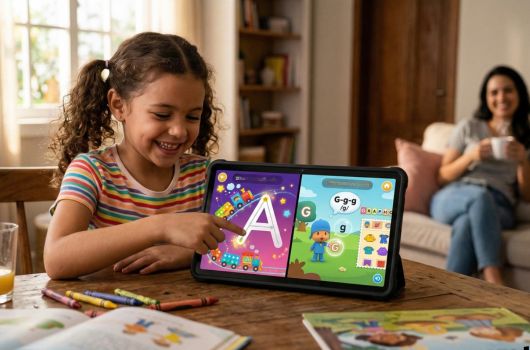
You can’t just hand the phone to your kid and run off to sort out your life, okay? Do this instead:
- Download your chosen app while the little one is sleeping (to avoid that “let me see, let me see!” anxiety).
- Set up the child’s profile peacefully and play the first two levels yourself. Get a feel for how the game flows.
- Sit next to them the very first time. Show them how to tap, how to drag their finger. Cheer together when they get something right!
- Let them take full control. If they mess up, hold back the urge to correct them by pointing at the screen. Let the app itself give the visual feedback.
Which one is your perfect match?
Let’s wrap this up and actually make your life a whole lot easier. Choosing the right tool shouldn’t be another chore on your endless to-do list, right? So let’s look at what is happening in your house right now.
If you are constantly finding papers with scribbles that look like alien code, and your main focus is teaching those foundational letter shapes, go with LetterSchool with your eyes closed. It is the absolute lifesaver for improving fine motor skills and fixing that wobbly handwriting before it becomes a really tough habit to break. Seriously, just download it and watch the magic happen.
But maybe you are at a different stage. Now, if your child already knows their ABCs backward and forward, but gets completely stuck and frustrated trying to blend syllables together? If they are struggling to figure out how those individual sounds actually form real words, then GraphoGame is going to be your absolute best friend on this journey. It takes that heavy, academic pressure off their shoulders and turns reading into a game they actually want to beat.
So, here is the million-dollar question: which one are you downloading tonight? Pick the one that fits your kid’s current struggle, guarantee some high-quality learning time for them, and—let’s be honest here—secure those glorious 20 minutes to finally drink a hot coffee in peace before it turns cold again. ☕