
Anúncios
You clicked this article because you need to find something metallic. You probably lost an earring back in the thick rug. Or maybe you want to drill a wall without hitting pipes. I have been in that exact same frustrating situation before. The natural reaction is searching for a metal detector app.
Anúncios
But then the real nightmare begins in the app store. You download five different programs in a row. Four of them crash your phone with endless fake ads. The last one looks pretty but uses a fake scanning animation. Nobody deserves to waste time and patience like that.
Since I got angry testing dozens of digital garbage, I will help. I will show you the only free tool that actually works. Pull up a chair. We are going to solve this mystery right now.
Anúncios
Why metal detector apps really make a difference
Before you think this is cheap magic, look at the hardware. Every modern smartphone has a tiny internal piece called a magnetometer. Its original mission is keeping the GPS aligned with the north. This way, your map knows exactly where you are looking. But this tiny smartphone magnetometer has an excellent side effect.

Metal Detector
3.8Informações sujeitas a alteração. Consulte a loja oficial para detalhes atualizados.
The phone magnetic sensor becomes a hunter
It gets extremely agitated near any dense magnetic field. If you put a piece of steel near it, things change. The invisible waves shift immediately. The right application notices this sudden change in physical data. It takes boring code and translates it into a loud beep. You do not need to be an engineer to understand it. It is not fake internet magic. It is pure science applied to your daily domestic life. Having a good treasure tracker application installed saves the day. The best part is that you spend zero money on it.
The real limit between expectations and physics
We need to align expectations about this technology first. You will never find a buried pirate ship on the beach. Phone hardware was built to read tiny distances. It only works within a few inches. If the iron is ten feet deep, the sensor feels nothing. However, for practical domestic use, it shines brightly. Did you drop a fine needle on a dark wooden floor? It finds it fast. Do you want to know where the hidden screws are? It maps them for you with plenty of room to spare. It is purely about using the phone magnetic sensor smartly.
The difference between ferrous and non-ferrous metals
You need to understand what this sensor can actually find. It does not react to every single metal on earth. It only searches for magnetic materials, mostly iron and steel. Gold rings, silver necklaces, and aluminum cans are invisible. So do not expect to find your lost wedding band. The metal detector app is literally looking for magnetic disturbances. But for lost keys, nails, and standard screws, it is perfect. They almost always contain iron in their basic composition. This detail alone saves you hours of useless scanning on carpets.
The best metal detector app: our honest selection
The internet standard demands a huge list with many names. The problem is that I would be lying to you. I installed and deleted over thirty different options today. I realized that almost everything is a scam for ad revenue. Only one warrior survived the real tests here at home. That is why our selection focuses on a single life-saving champion.
Smart Metal Detector
3.8
Metal Detector
Informações sujeitas a alteração. Consulte a loja oficial para detalhes atualizados.
The vibe: Custom made for those who want instant answers. The look has a very clean and direct feel. It closely resembles the analog dashboard of a sports car. There are no hidden menus or complicated technical language to translate.
What it does in practice: It turns your screen into a giant physical meter. When you move the phone near the floor, the needle jumps. I tested this by touching my phone to a heavy door hinge. It beeped crazily and vibrated hard right away. You do not even need to look at the screen. The high-pitched sound indicates exactly where the lost piece is hiding.
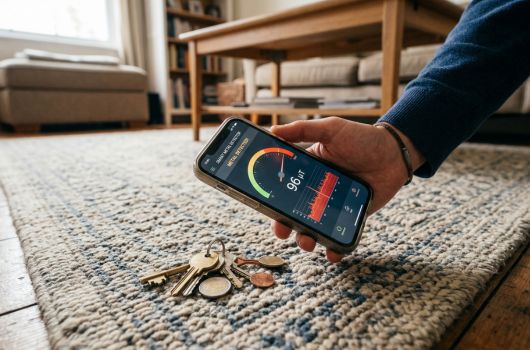
The catch: The brilliant simplicity of the integrated auto-calibration tool. Your device might bug out and read its own battery. When this happens, it warns you the data is corrupted. You just press a green button and shake the phone. You draw a figure eight in the air. Simple as that. It resets the magnetic count and tracks perfectly again.
Our honest opinion: The response time of the green graph is simply immediate. There is no terrible delay that makes you miss the spot. We even found a tiny screwdriver in the tall backyard grass. What is not so cool during use? The stubborn ad stuck at the bottom of the free version. Sometimes, in the heat of the search, you tap it accidentally. That being said, the absolute reading precision makes up for it. (By the way, the dark background saves battery during long searches). 🕵️♂️
See also:
- Phone Lagging? Best Apps to Clean Phone Memory
- Glucose tracking apps: the 2 best for your daily routine
- Slow Net? 2 Apps to Improve Internet Connection on Your Phone
- Apps to pray the rosary: Discover the Secret of Faith
- Best Home Decorating Apps to Transform Your Space
How to start finding lost coins without complication
There is no point opening the program without a strategy. There is a specific method so the magnetometer does not confuse itself. Follow this exact checklist to avoid getting angry and giving up.
- Remove any protective case, especially thick wallet-style covers. Car mount magnets ruin the reading of any metal detector app.
- Move away from computers, monitors, or working microwaves. The natural radiation from these appliances easily fools the phone reader.
- Hold the phone firmly with both hands right now. Draw the number eight in the air three times slowly.
- Bring the rear camera area close to the target floor. The sensor is almost always near the main glass lenses.
The perfect scanning movement
Your hand movement technique guarantees the success of the mission. Many people shake the phone way too fast. The processor just cannot keep up with the data volume.
- Move your hand at the pace of a limping turtle. Glide it very close to the surface you are testing.
- Keep your eyes fixed on the central needle graph. Keep your ears focused on the noise pattern.
- When it jumps hard or the sound screams, stop instantly. Move the phone back about two inches very slowly.
- Make tiny circular movements focused only on the noisy spot. This will pinpoint the exact location of the lost piece.
What to do if the app stops working suddenly
Sometimes the sensor gets overwhelmed by too much metallic noise. If the graph gets stuck at the maximum red level, pause. Do not uninstall the application in a fit of pure rage. Just step away from the wall or the floor. Point the cell phone to the empty ceiling for a second. Press the calibration button again and do the figure eight. This clears the temporary memory of the smartphone magnetometer instantly. It is like rebooting a frozen computer, but much faster. You will be back to your search in ten seconds.
Which metal detector app is for you
We normally end guides comparing three or four different options. The goal is always to make your final download decision easier. But the scenario we tested today is much more direct. If you actually want to locate that missing tiny screw. The Smart Metal Detector is easily your only safe route today. If you prefer wasting hours downloading fake games that freeze screens. The store has dozens of traps available for you. I hate wasting my productive time, and I know you do too. Life is super busy. Nobody has extra energy to watch bad game ads. So, install this honest tool, calibrate it calmly, and fix this soon. What are you going to try hunting first in your living room?
Official download links
Always download through the verified stores of your operating system. Never accept loose files from random internet links.
Metal Detector
3.8Informações sujeitas a alteração. Consulte a loja oficial para detalhes atualizados.