
Anúncios
Saw that ad saying you can find lost things using just your phone? You probably clicked thinking it was pure invention. Or just another cheap internet trick. Except the truth is actually very different.
A good metal detector app really works and uses pure technology. That ring that fell into the fluffy living room rug can still be saved. That house key that vanished in the tall grass too. You do not need to buy expensive professional panning equipment to solve this. We can solve this problem with the device already in your hand.
Your own smartphone already has the necessary hardware piece for this exact job. You just need to install the right tool and learn to use the sensor. And I will show you exactly how to make this magic happen right now.
The magic behind your metal detector app
Let us understand how this works in practice so you do not think it is witchcraft. Your phone measures the ambient magnetism in a unit called microtesla. The symbol that will appear on your screen is µT. The normal level of the Earth’s magnetic field is around 49 µT. This is the baseline number you will see when you open the tool. If there is no metal near you, the number stays right around there.
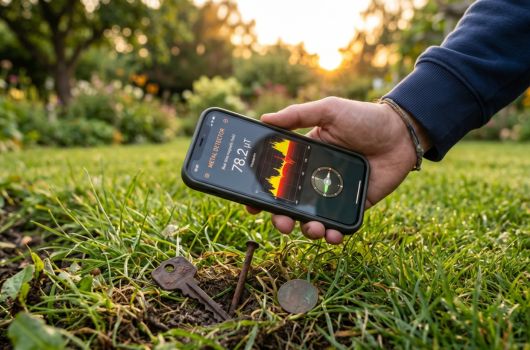
Except the game changes when you bring the phone close to a metallic object. The metal distorts the Earth’s natural field very quickly. The number on your device’s screen will suddenly shoot up. It will jump from 49 to 60, then to 80 or even pass 100 µT. The best part is that the phone starts vibrating along with this. The alert sound gets faster and higher pitched. Remember that submarine radar noise in old movies? It is exactly the same feeling of urgency and proximity. You know right away that there is something hidden there under the dirt or the rug. This changes the way you look for lost objects completely.
The best metal detector apps: our honest selection
Metal Detector (Netigen / Smart Tools)
 3.8
3.8
Metal Detector
Informações sujeitas a alteração. Consulte a loja oficial para detalhes atualizados.
The vibe: For those in absolute despair or just very curious about technology. You lost something metallic right now and need an urgent and straightforward solution. It is the absolute Swiss army knife of emergency applications.
What it does in practice: It uses your phone screen to show the exact level of the local magnetic field. It measures the microteslas (µT) in real time without annoying delays. When you get close to a nail or a key, the numbers go crazy. The phone starts vibrating in your hand in a way that is impossible to ignore. The beep speeds up as you get closer to your hidden target.
The secret sauce: The absurd and visual simplicity of the graphic on the app’s main screen. There are no confusing buttons or endless menus to mess up your life. You open the tool and it is already measuring the room right away. It draws a colored graphic line in real time. You literally see the line going up and turning red as you get close to the lost object.
Our honest opinion: This is my absolute favorite for casual everyday use. Honestly, the visual interface looks a bit old and stuck in time. It looks like a 90s car dashboard, with those strong colors. But what matters here is that it delivers real and very precise results. What really bothers me a bit is the amount of ads on the screen. There are plenty of ads popping up in the free version and that gets irritating sometimes. Except that does not stop your search for the lost object (by the way, I found a sewing needle like this yesterday). It does exactly what it promises without charging you anything for it.
What your metal detector app cannot find
We need to be very honest about the real limitations of this amazing technology. Your phone’s sensor looks for magnetic distortions, as we discussed earlier. This means it only finds metals that react to real magnets. If you lost a pure gold wedding band in the beach sand, we have a problem. Gold is not a magnetic material and does not alter the phone’s sensor. Silver and aluminum also fall into this exact same complicated category. The application will not beep for a buried soda can, for example.
Many people get frustrated and uninstall the metal detector app because they ignore this. They try to find a lost diamond earring and obviously fail. Diamonds are stones, not metals. The sensor will never pick up a stone, no matter how expensive it is. The same rule goes for plastics, glass, and wood. You need to focus entirely on ferrous materials.
That being said, it is an absolute monster for finding other important things. It finds iron, steel, nickel, and several common everyday metallic alloys. You know that house key full of teeth? It finds it in seconds. You know that tiny screw that dropped while assembling the shelf? It finds that too. Many old and modern coins also make the sensor go crazy without mercy. So, before sweeping the entire backyard, understand what you are looking for. A good trick is to test a similar object with a fridge magnet first. If the magnet sticks, your phone will definitely find it in the dirt. This saves your time and avoids unnecessary frustrations.
See also
- Top Apps to See Who Visited Your Instagram or Facebook Profile
- Free Nursing Courses with Certificate
- How to clean dirty grout without scrubbing until your arm falls off
- App to Measure Glucose: The Best Way to Track Your Health
- The Ultimate Homemade Ant Killer
The secret to making your metal detector app work perfectly
There is a technical detail that almost no one pays attention to before starting. Your phone’s magnetometer usually gets a little confused from time to time. It suffers constant interference from other large electronic devices inside your house. The TV turned on generates a strong magnetic field that messes up the sensor. Your desktop computer and the refrigerator also cause exactly the same problem.
Because of this, you need to calibrate the device before starting your real hunt. Move away from these large electronic devices and go to an empty corner. Hold the phone firmly in your hand and make a specific movement in the air. Draw a sideways number 8 in the air with your arm, repeating it three times. This simple movement resets the internal magnetic sensor’s confusions. The number on your screen should stabilize near the 49 µT we mentioned before. Now your device is finally ready to find really small things. Calibration is the hidden trick that makes any metal detector app shine.
How to start without complications: step by step
- Download the application from your phone’s official app store right now.
- Open the tool and accept the basic permissions it asks for on the home screen.
- Stay away from computers, televisions, and speakers to avoid massive interference.
- Move your phone loosely in the air making a figure 8 drawing.
- Look at the screen and see if the base number stabilized near 50 µT.
- Bring the device close to something metallic you already have at home to test.
- Watch the graphic rise quickly on the screen and hear the alert beep go off.
- Now go to the specific area where you think you lost your real object.
- Move the phone very slowly, sweeping the surface as close to the ground as possible.
- When the beep speeds up and the screen turns red, you found what you were looking for.
Which metal detector app is for you
Since we only showed the absolute champion in this article, your choice is already made. If you want to find lost nails in your house wall, it solves the problem. If you prefer something powerful to find keys dropped in the tall grass, it delivers best. You just need to have a little patience with the initial calibration we taught above. After that, just go sweep the floor like a real detective. Download the application right now and run a quick test in your own home. Grab any magnetic coin and watch the magic happen on the screen. What are you waiting for to test this incredible trick today?