
Anúncios
You probably clicked on that ad because it touched a real nerve. The promise was clear: there is a simple way to help an older person become literate using just a smartphone. No shame, no crowded classrooms, and completely at their own pace.
And the very first question that pops into your head is whether an app to learn to read and write can actually replace paper and pen.
The short answer is yes. The long answer is that you need the exact right tool. Most people download any random educational game, hand the phone over to the senior, and expect a miracle. That is not how it works. A phone keyboard is tiny, the screen is slippery, and frustration sets in fast.
In this article, we are going to deliver exactly what you came looking for. We tested the available options and filtered out what truly works for hands that might shake a little and eyes that need bigger letters. You will leave here knowing exactly which application to download today.
Why literacy apps actually make a difference
Think about traditional literacy classes for adults. A person has to commute to a school at night, usually after a deeply exhausting day. Actually, there is a massive emotional weight attached to that. Many feel ashamed to sit at a school desk after they turn 50 or 60.
The smartphone breaks that barrier right down the middle.
Learning through a phone is incredibly intimate. Nobody on the bus knows if the person is reading the news or learning the sound of the letter “A”. It is like riding a bike with invisible training wheels. The device’s screen offers a highly secure environment where making a mistake does not attract weird looks.
And there is more: the phone solves a physical problem. The pincer movement required to hold a pencil can be quite painful for someone who has arthritis or has simply lost the habit of writing by hand. Sliding a finger across a glass screen demands far less effort from the joints.
The visual focus shifts completely, too. A book has dozens of lines that blend together. A good application isolates a single word or letter on the entire screen. That locks in attention. The immediate auditory feedback also speeds up the brain’s processing. If you tap the syllable “BA”, the phone says “BA” right then and there. This connection between the finger, the eye, and the ear builds learning in a way that paper alone simply cannot match.
But we need to be strictly realistic here. Not everything sitting in the app store is useful. Many are confusing, packed with ads that an older person might click by accident, and end up causing viruses or sheer annoyance. That is exactly why we went after the safest options.
The best apps to learn to read and write: our honest selection
Whether it is for you, your parents, or your grandparents, here are the options that deliver real results without the headache.
Learn to Read and Write (LetterSchool)
 4.4
4.4
LetterSchool – Learn to Write
Informações sujeitas a alteração. Consulte a loja oficial para detalhes atualizados.
The vibe: For those who need to start from absolute zero. You know when a person still lacks the steadiness to draw a letter or confuses their shapes? This is the ideal starting point to train both the brain and the fingers.
What it does in practice: It turns the phone screen into a magical calligraphy notebook. The application shows you the outline of a letter, and you have to trace your finger over it. If you trace the wrong path, it stops you from continuing. You repeat the stroke until the movement feels entirely natural.
The real trick: The visual feedback. When you correctly trace the letter, the line transforms into animated things, like train tracks or glowing lights. This holds the attention and gives an immediate sense of reward.
Our honest opinion: I need to be completely transparent here: its interface is childish. It was designed for kids. But in practice, its motor repetition mechanics are the best on the market for seniors. The fine motor skills required to use smartphones are genuinely hard for older people. Using LetterSchool for a few days completely removes the fear of touching the screen. Ignore the colorful drawings and focus purely on training the hand. It is worth every minute.
Palma Escola
 1.4
1.4
Palma Escola
Informações sujeitas a alteração. Consulte a loja oficial para detalhes atualizados.
The vibe: That patient private tutor who understands an adult’s reality. Focused on everyday culture and the vocabulary people actually use in real life.
What it does in practice: It does not teach childish words like “fairy” or “dice”. It works with words like “work”, “beans”, “money”, and “bus”. The app associates audio, real images, and loose letters to form the vocabulary that the adult person already uses in real life, but just did not know how to spell.
The real trick: The adult context. Learning to read using fake bills and grocery lists makes the senior understand the practical utility of every single letter. They feel like they are actually solving their own life.
Our honest opinion: The visual design of the app is quite simple, bordering on outdated. The buttons are not super modern. But the methodology is fantastic. It understands that an adult’s brain works through practical association. It can be slightly heavy for very old phones, so just make sure you have enough memory space before downloading.
GraphoGame
 4.4
4.4
GraphoGame Brasil
Informações sujeitas a alteração. Consulte a loja oficial para detalhes atualizados.
The vibe: For someone who already knows a few letters but freezes when it is time to put everything together to read a full word. It is the absolute king of phonological awareness (understanding the sound of syllables).
What it does in practice: The app works like a game where you create a little avatar and listen to sounds. A voice narrates a sound (“VEE”) and several letters fall on the screen. You have to tap the right letter before it hits the ground.
The real trick: It works 100% without the internet. You download it on your home Wi-Fi, and the senior can play it on the bus, in the bank line, or anywhere else, without spending a single cent of their data plan (and without annoying ads jumping on the screen).
Our honest opinion: It is backed by educational experts and researchers. That means it is highly safe and validated. The beginning is a bit slow, and the robotic voice can get tiring after half an hour. But the repetition genuinely works. If the person plays just 15 minutes a day, in a few weeks they will stop guessing words and start reading the syllables for real.
See also:
- 5 Homemade Recipes to Lose Weight at Home
- Check License Plate: The 3 Best Apps
- Metal Detector App: The Only One That Actually Works
- Phone Lagging? Best Apps to Clean Phone Memory
- Glucose tracking apps: the 2 best for your daily routine
How to start without complications
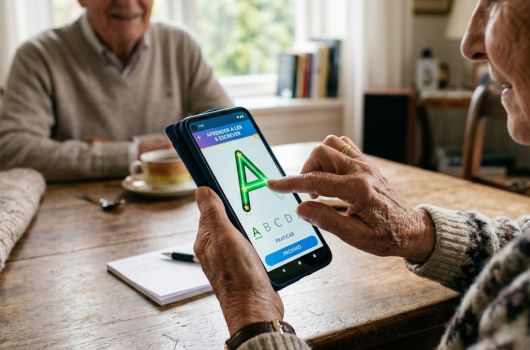
You have already chosen an app to learn to read and write. What now? Handing the phone to the person and walking away is a guaranteed recipe for frustration. Do this instead:
- Go into the phone’s settings and turn the screen brightness all the way up.
- Turn up the volume or find a pair of comfortable headphones. Sound is essential here.
- Sit right next to the person on their very first day of using it.
- Do not touch the screen for them. Point with your finger, but let them do the tapping.
- Show them exactly how to get back to the home screen if they press something wrong by accident.
- Start with short sessions of just 10 or 15 minutes. Exhaustion creates mental blocks.
- Celebrate the tiny victories. Getting a single syllable right is already a massive step forward.
Which one is for you
Let’s simplify your life right now. If the person has shaky hands and barely knows how to hold a smartphone properly, LetterSchool is the initial path to unlock touching the screen confidently. If you want to focus on useful vocabulary for an adult’s daily routine, go straight for Palma Escola. Now, if the person already knows the letters but cannot blend the sounds, and you do not want them wasting mobile data, GraphoGame delivers the absolute best result.
You have already taken the most important step, which was researching a solution. Which one of these are you going to install on the device today? 📱
Quick download links
4.4
LetterSchool – Learn to Write
Informações sujeitas a alteração. Consulte a loja oficial para detalhes atualizados.
4.4
GraphoGame Brasil
Informações sujeitas a alteração. Consulte a loja oficial para detalhes atualizados.
1.4
Palma Escola
Informações sujeitas a alteração. Consulte a loja oficial para detalhes atualizados.